The Event Page
Tap any event to open its page. It has everything you need for that game or practice.
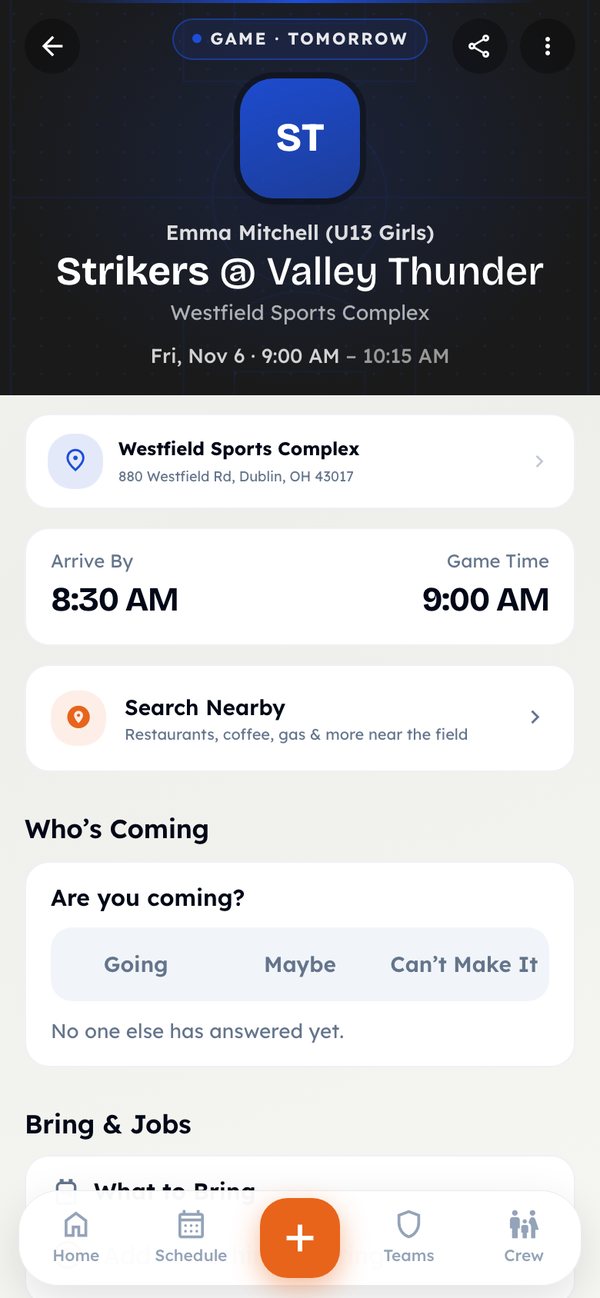
At the Top
- When and where, with directions to the field.
- Arrive By: when to get there. It comes from the team's arrive-early setting (set on the team page) or the event's own Arrive Early time.
- The weather for game time.
- If the time or place changed recently, a Changed note shows what it was before.
Timeline
For upcoming events, the Timeline lays out the day: when to leave home (if you've added your home address), when to arrive, when it starts and ends, and when you'll be home.
Who's Coming
For games and other events that aren't practices, Who's Coming asks Are you coming? Tap Going, Maybe or Can't Make It, and see everyone else's answers.
Under Rides, Is [name] going? (Going, Maybe or Can't Go) tells your crew whether the kid needs a ride.
Bring & Jobs
- What to bring: a checklist, like water bottle, cleats or uniform. Add your own items.
- Jobs: things that need a person, like Snack Parent or Water Duty. Tap I'll Do It to take one, or Add a Job. Add the Usual Jobs adds the common ones in one tap.
Rides
Who's driving there and who's picking up. See Who's Driving.
Keep Score
On game day, the page shows Keep Score Live (or Get Ready to Keep Score just before). After the game, it shows Game Recap. See Live Scoring and Game Recaps.
Near the Field
Tap Search Nearby for restaurants, coffee, gas and more near the field, for between games or after.
Share an Event
Tap the share button at the top to send the event to anyone, in a text or anywhere else. They get a page they can open without the app. To stop that link working, tap ⋯ → Turn Off Public Link.
More (⋯)
- Edit Event
- Repeat: every week, every 2 weeks or every month.
- Chat About This: a thread for this event with your crew.
- Cancel Event: keeps it on the calendar and tells your crew. Put Back On undoes it.
- Delete Event
See Paste a Link, Say It, or Type It In for more on editing and canceling.