Get Help and Send Ideas
Stuck, found a bug, or have an idea? Tell us right in the app. A real person on our team reads every message.
Send Us a Message
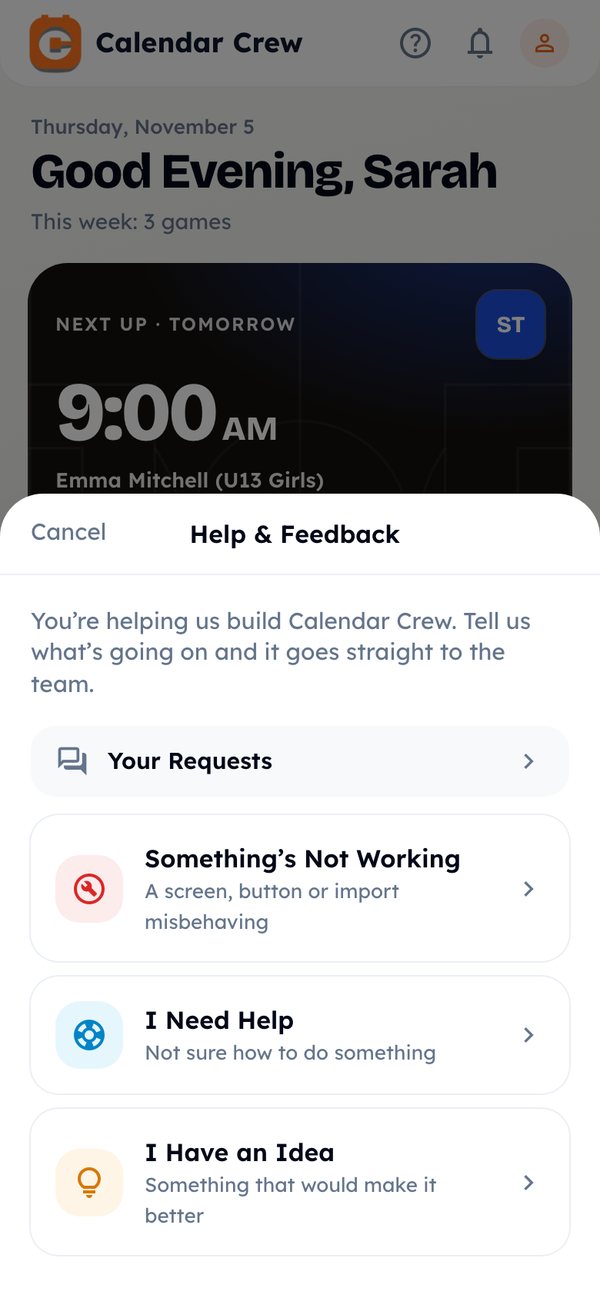
- Tap the ? at the top of the screen, next to the bell. (Or tap your picture → Help & Feedback.)
- Pick one:
- I Need Help: not sure how to do something.
- Something's Not Working: a screen, button or import misbehaving.
- I Have an Idea: something that would make it better.
- Tell us what's going on. Add a screenshot if it helps.
- Tell us how much it matters, then send it.
We'll reply in the app and by email.
What we include
To help us fix things faster, we include your device details and the last minute of the screen, with all text and photos hidden.
Your Requests
Tap your picture → Your Requests to see everything you've sent and our replies. Tap one to read it or add more. Replying to a resolved request reopens it.
Each request shows where it stands:
| Status | What it means |
|---|---|
| Open | We have it and haven't started yet. |
| In Progress | We're working on it. |
| Your Reply | We asked you something. Open it and reply so we can keep going. |
| Resolved | It's sorted. Reply if it isn't. |
Ideas show our plan once we've decided:
| Status | What it means |
|---|---|
| Under Review | We're looking at it and haven't decided yet. |
| Planned | We're going to build it. |
| Live | It's in the app now. |
| Not Planned | Not for now. We'll say why. |
Other Ways to Reach Us
Email support@calendarcrew.com.