Free and Crew Plus
Calendar Crew has two plans: Free, and Crew Plus for families with more teams or more schedules to bring in. One plan covers your whole family.
To see your plan, tap your picture → Plan.
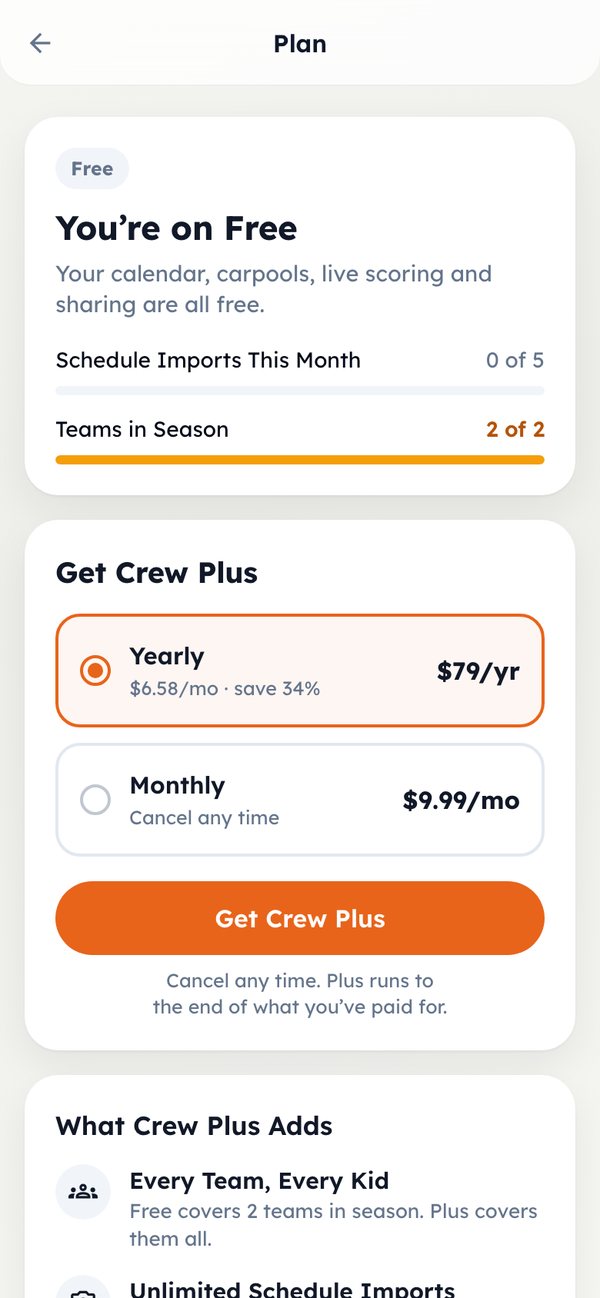
While we're in early access, every family has Crew Plus on us. Your Plan page says On Us Until Launch. You don't need to do anything. You can subscribe early to lock in the Founding Family price, and nothing is charged until early access ends. We'll email you before your first charge.
What's Free
Free is a full calendar for a family, not a demo:
- Your family's calendar, with every kid
- Who's Driving, Bring & Jobs, and who's going
- Live scoring and game recaps (score, stats, photos)
- Up to 6 kids and 6 people in the crew (teen accounts don't count)
- Sharing with your crew, and follower links for grandparents (followers are always free)
- Connected calendars that update on their own, and your phone's calendar
- 2 teams in season at a time
- 5 schedule imports a month
No ads, ever. We never sell your family's data.
What counts toward the Free limits
- Teams in season: a team counts if it has a game in the last two weeks or the next two months, or you added it in the last month. When a season ends, that team stops counting.
- Schedule imports: every schedule we read for you counts: a photo, a screenshot, a pasted link, something you said or typed, or a forwarded email. The count starts over on the 1st of each month.
Hit a limit? You can still type games in by hand, any time.
What Crew Plus Adds
| Every team, every kid | No limit on teams in season. |
| Unlimited schedule imports | Snap, paste, share a link or forward an email as often as you need. |
| AI game recaps | Write a Summary turns a game into a short story to share with grandparents and the team. |
| Weekly insights | A short read each week on how the season is going, once a few games are in. |
| Videos in recaps | Add game videos to a recap. Photos are free on every plan. |
| Room for a bigger crew | Up to 12 kids and 10 people in the crew. |
| Time to Leave alerts | A nudge when it's time to head out for a game. |
| One price for the whole crew | Co-parents, grandparents and caregivers in your family are all covered. |
Prices
- Yearly: $79 a year (about $6.58 a month)
- Monthly: $9.99 a month, cancel any time
- Founding Family: $49 a year for families who join early. You keep this price as long as you stay subscribed.
Prices are in US dollars. Pay with a card, Apple Pay, Google Pay or Link.
Free Trial
New families get 30 days of Crew Plus free, with no card needed. Your Plan page shows how many days are left.
- If your season hasn't really started yet (fewer than 3 games during the trial), we add 14 more days, once, on its own.
- When the trial ends, you move to Free. Nothing is deleted.
- One trial per person.
Get Crew Plus
- Tap your picture → Plan.
- Choose Yearly or Monthly.
- Tap Get Crew Plus (or Keep Crew Plus during a trial).
- Pay on the secure checkout page, then you're back in the app.
Only a family admin can start Crew Plus. If you're not an admin, the Plan page asks you to ask one. Everyone in the family gets Plus either way.
If you subscribe during a trial, your first charge is the day the trial ends.
Manage Your Plan
Tap your picture → Plan → Manage Plan to:
- Change your card
- See receipts
- Switch between yearly and monthly (a switch to monthly starts when your year renews)
- Cancel, or turn renewal back on
Your Plan page also shows who pays, like "Paid by Sarah."
Cancel
Tap Manage Plan → cancel. You won't be charged again, and Crew Plus stays on until the end of the time you've paid for. Then your family moves to Free. Nothing is deleted.
We email you before each yearly renewal, so it's never a surprise.
If a Payment Doesn't Go Through
You'll see "Your last payment didn't go through" on your Plan page, and an Update Card button. Crew Plus stays on while we try the card again over the next few weeks. Update your card and you're all set. If it still can't go through, your family moves to Free. Nothing is deleted.
Questions?
Tap the ? at the top of the app → Help & Feedback. See Get Help and Send Ideas.